
Download Komoot – Free Route Planning, Hiking, Cycling, Navigation App
Overview
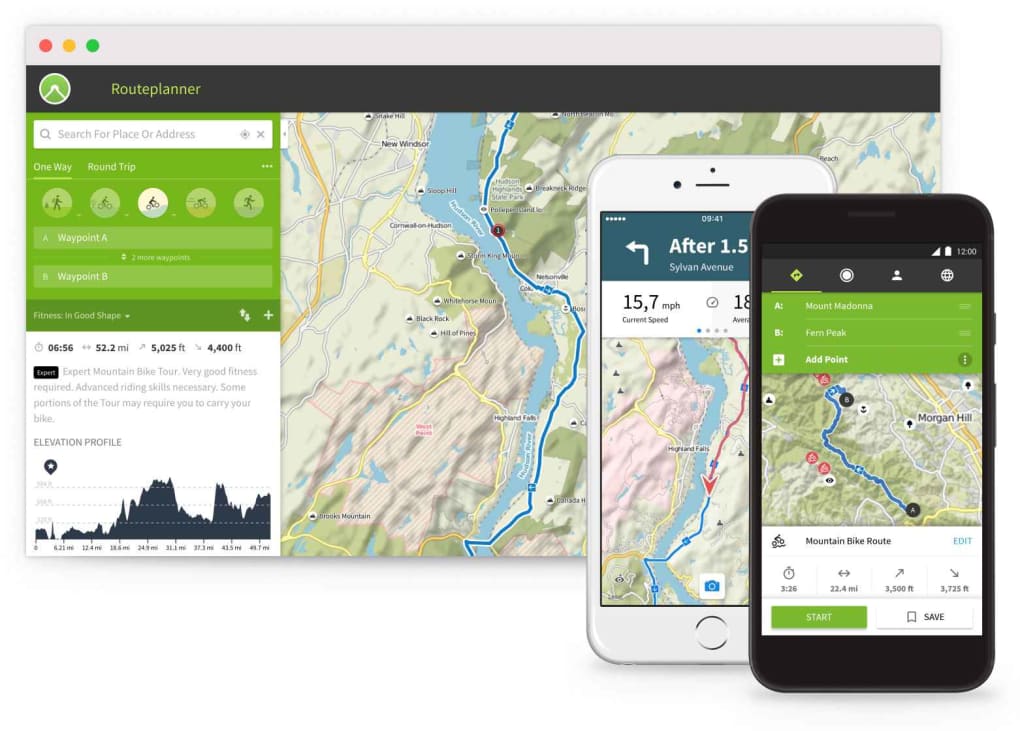
Komoot is a free, data‑driven route planning app designed for outdoor enthusiasts who love to explore new places on foot, bike, or mountain‑bike. Whether you’re planning a leisurely city stroll, a challenging gravel‑ride, or a multi‑day hike across rugged terrain, Komoot combines topographical maps, elevation profiles, surface‑type information, and community tips into one seamless planner. The platform works across a web interface and native mobile apps for iOS and Android, letting you design a route on a desktop and sync it instantly to your phone or compatible GPS device such as a Garmin watch.
By prioritising the type of road or trail you prefer—tarmac, gravel, dirt, or forest paths—Komoot helps you predict climbs, avoid unsuitable surfaces, and stay on course without the guesswork. The app also offers turn‑by‑turn voice navigation, offline map downloads, and real‑time weather overlays, ensuring you can focus on the adventure rather than the logistics. In short, Komoot turns the uncertainty of outdoor navigation into a smooth, enjoyable experience, making it a go‑to tool for cyclists, hikers, trail‑runners, and casual walkers alike.
Key Features
- Customisable Route Planning: Choose sport (hiking, cycling, mountain biking, road biking, running), set start and end points, and let Komoot suggest optimal paths based on surface type and difficulty.
- Detailed Topographical Maps: High‑resolution maps include contour lines, elevation data, and 3‑D terrain visualisation for precise navigation.
- Surface‑Type Indicators: Every segment is colour‑coded (asphalt, gravel, dirt, singletrack) so you can see at a glance whether a trail matches your bike or shoe.
- Voice‑Guided Turn‑by‑Turn Navigation: Offline‑enabled voice prompts keep you on track even when cellular service drops.
- Community Recommendations: User‑generated “highlights” appear as red dots on the map, pointing out cafés, bike shops, scenic viewpoints, and secret shortcuts.
- Garmin & Device Integration: Sync routes directly to Garmin, Wahoo, and other popular GPS devices for a seamless offline experience.
- Offline Maps & POI Packs: Download regional map packs (Europe, North America, Asia) for use without internet, saving data and battery.
- Real‑Time Weather Overlays: Integrated weather forecast helps you avoid storms or extreme heat on the day of your outing.
- Progress Tracking & Stats: Record distance, elevation gain, average speed, and calories burned; export GPX or KML files for further analysis.
- Multi‑Day Tour Planning: Break long routes into daily legs, add waypoints, and generate packing lists for extended trips.
Installation & Usage Instructions
Getting started with Kom Komoot is straightforward. First, visit the official website (komoot.com) and create a free account using your email address or a Google/Facebook login. After confirming your account, you can begin planning routes directly in the browser. To plan a route, click “Plan a Route,” select your sport, and then enter your start and end locations. The map will automatically suggest a route based on your preferences; you can drag the line to customise waypoints, add stops, or avoid certain road types.
For mobile use, download the Komoot app from the Apple App Store or Google Play Store. Search for “Komoot – Hiking & Cycling GPS” and tap “Install.” Once installed, log in with the same credentials you used on the web. Your saved routes will sync automatically, and you can download them for offline use by tapping the download icon next to each map pack. Before heading out, enable location services and grant the app permission to run in the background for continuous tracking.
When you’re ready to navigate, open the route in the app and press “Start Navigation.” Komoot will provide voice prompts and a clear visual map with surface‑type shading. If you’re using a Garmin device, open the Komoot website, select “Export to Garmin,” and follow the on‑screen steps to transfer the route via Bluetooth or USB. For multi‑day tours, use the “Tour Planner” feature to split the journey into daily segments, add accommodation points, and generate a printable itinerary.
Compatibility: Komoot runs on iOS 13+ and Android 7.0+, and the web app works with any modern browser (Chrome, Firefox, Safari, Edge). Desktop users can also install a Progressive Web App (PWA) for quick access without a browser tab.
Pros and Cons
Pros
- Free core features with optional premium map packs for deeper coverage.
- Highly accurate topographical data and surface‑type classification.
- Strong community integration—real‑world tips from local cyclists and hikers.
- Offline maps ensure navigation works in remote areas without data.
- Seamless sync with Garmin and other GPS devices.
- Intuitive UI for both beginners and power users.
Cons
- Premium map packs (regional) require a one‑time purchase.
- Voice navigation can be less precise on very winding mountain trails.
- Limited customisation for advanced routing algorithms (e.g., avoid steep climbs).
- Free version displays ads on the web interface.
- Some users report occasional sync delays between web and mobile apps.
Frequently Asked Questions
Is Komoot completely free to use?
Komoot offers a robust free tier that includes unlimited route planning, basic map access, and community highlights. However, detailed regional map packs (e.g., Europe, North America) and advanced offline features require a one‑time purchase or a subscription.
Can I use Komoot without an internet connection?
Yes. After downloading the required map pack for your region, you can navigate offline, receive turn‑by‑turn voice prompts, and track your progress without cellular data.
How accurate are the elevation profiles?
Komoot sources elevation data from multiple global providers (e.g., SRTM, OpenTopo) and applies smoothing algorithms. For most recreational activities, the elevation profile is within 5‑10 meters of the actual climb, making it reliable for planning.
Does Komoot work with my Garmin Edge 1030?
Yes. Komoot integrates directly with Garmin Edge series, Wahoo, and other popular bike computers. Simply export the route from the Komoot web app and sync via Garmin Connect or Bluetooth.
Can I share my routes with friends?
Absolutely. Each route generates a shareable link and can be posted to social media, sent via email, or shared within the Komoot community. Friends can view, comment, and even download the route to their own devices.
Conclusion & Call to Action
Komoot stands out as a comprehensive, free‑to‑start solution for anyone who wants to explore the outdoors with confidence. Its blend of accurate maps, surface‑type details, community insights, and offline capabilities makes it a reliable companion for cyclists, hikers, and casual walkers alike. While premium map packs add value for power users, the core experience is already powerful enough for most weekend adventures. If you’re looking for a tool that reduces navigation anxiety, helps you discover hidden local gems, and integrates smoothly with your favorite GPS device, Komoot is worth a download.
Ready to start planning your next trail? Download Komoot now on iOS, Android, or via the web and unlock a world of free, secure, and data‑driven route planning. Happy exploring!
Komoot delivers an impressive mix of detailed mapping, community recommendations, and offline functionality. The free tier is generous, and the optional map packs add depth for serious trekkers. Minor quirks like occasional sync delays do not outweigh the overall benefit of having a trustworthy navigation companion.
- Pros: Accurate maps, community highlights, offline support.
- Cons: Premium map packs cost extra, occasional sync lag.



.png)



